Capabilities and Plugins
Capabilities extend Skulk into a platform for services, tools, and applications. They can use the fabric's models and compute, integrate another service, and provide a purpose-built interface alongside callable operations. Inference is one foundation on which these applications can build.
| Term | Meaning |
|---|---|
| Capability | A declared operation or service the fabric can provide |
| Plugin | An installable package that supplies one or more capabilities |
| Capability node | A logical provider with its own identity, health, settings, and available actions |
| Satellite | The topology's representation of a capability node sharing a host with a Skulk compute node |
A capability node is not necessarily another physical machine. Multiple capability nodes can share a host. Some provide an application interface; others expose operations for clients and tools. Built-in speech providers use Skulk's own mounted model capacity, while plugins add independently packaged services.
Discover and open a capability
Open Cluster and look for capability nodes. On a host that also runs a Skulk compute node, capabilities appear as satellites beside that host. Select a satellite to see the provider's name, readiness, and available actions.
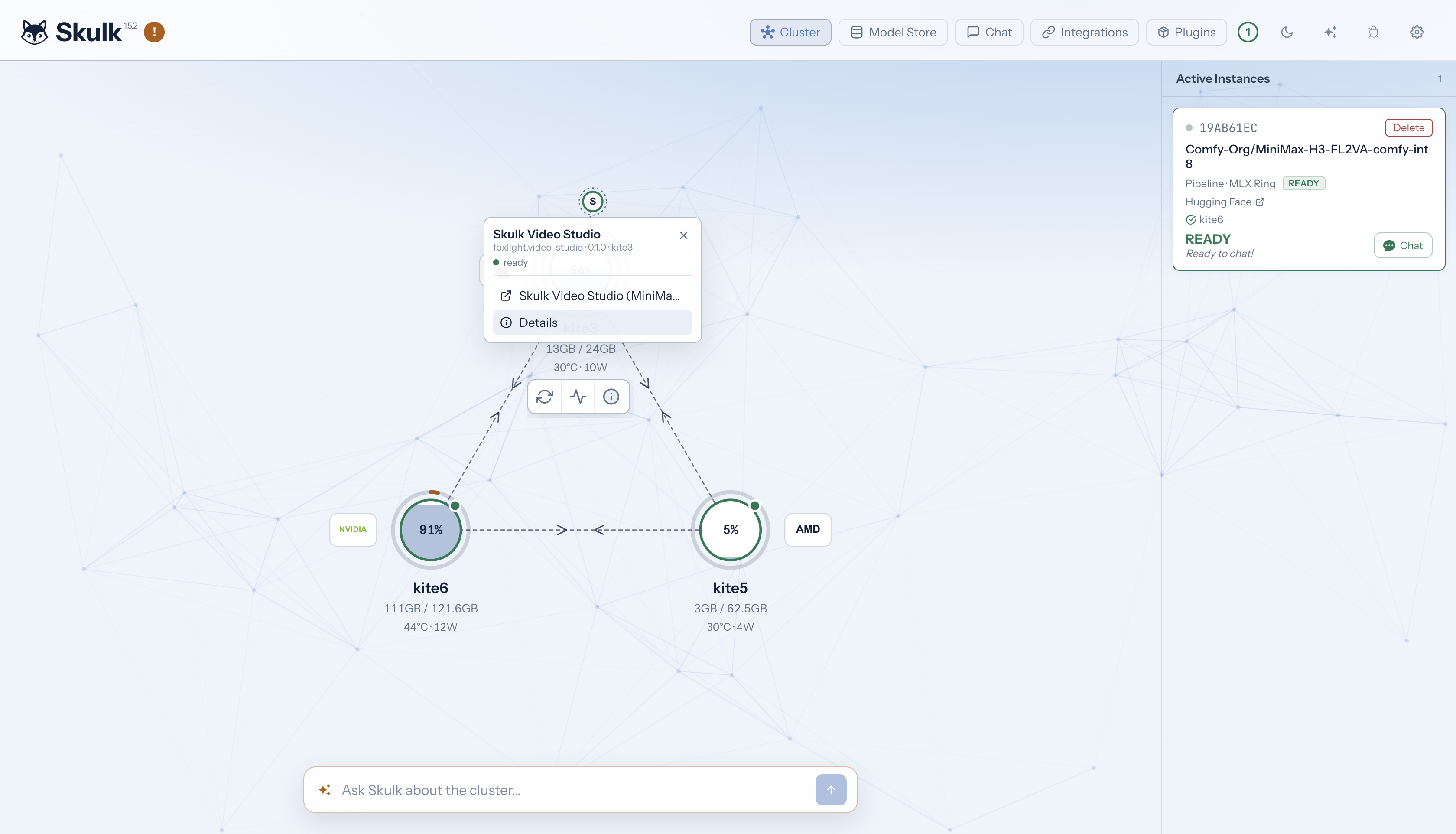
Choose the application link to open a ready interface, or Details to inspect the capability. Available actions come from the provider; a capability without an application interface can still expose useful operations. Opening an interface does not itself launch a model or submit work.
Application links must be reachable from your browser. When a capability's host runs Tailscale, Skulk gives the host's plugins its Tailscale address. A plugin built for this serves its screens there as well as on loopback, so any browser on your tailnet can open them, and the local network cannot. Tailscale's own access rules decide which of your machines reach the host at all. On a host without Tailscale, or for a plugin built before this, a surface on the host's loopback address needs a browser on that host; discovery alone does not make it remotely accessible. Configuration and management actions can also require access to the dashboard on the capability's host.
Example: Skulk Video Studio
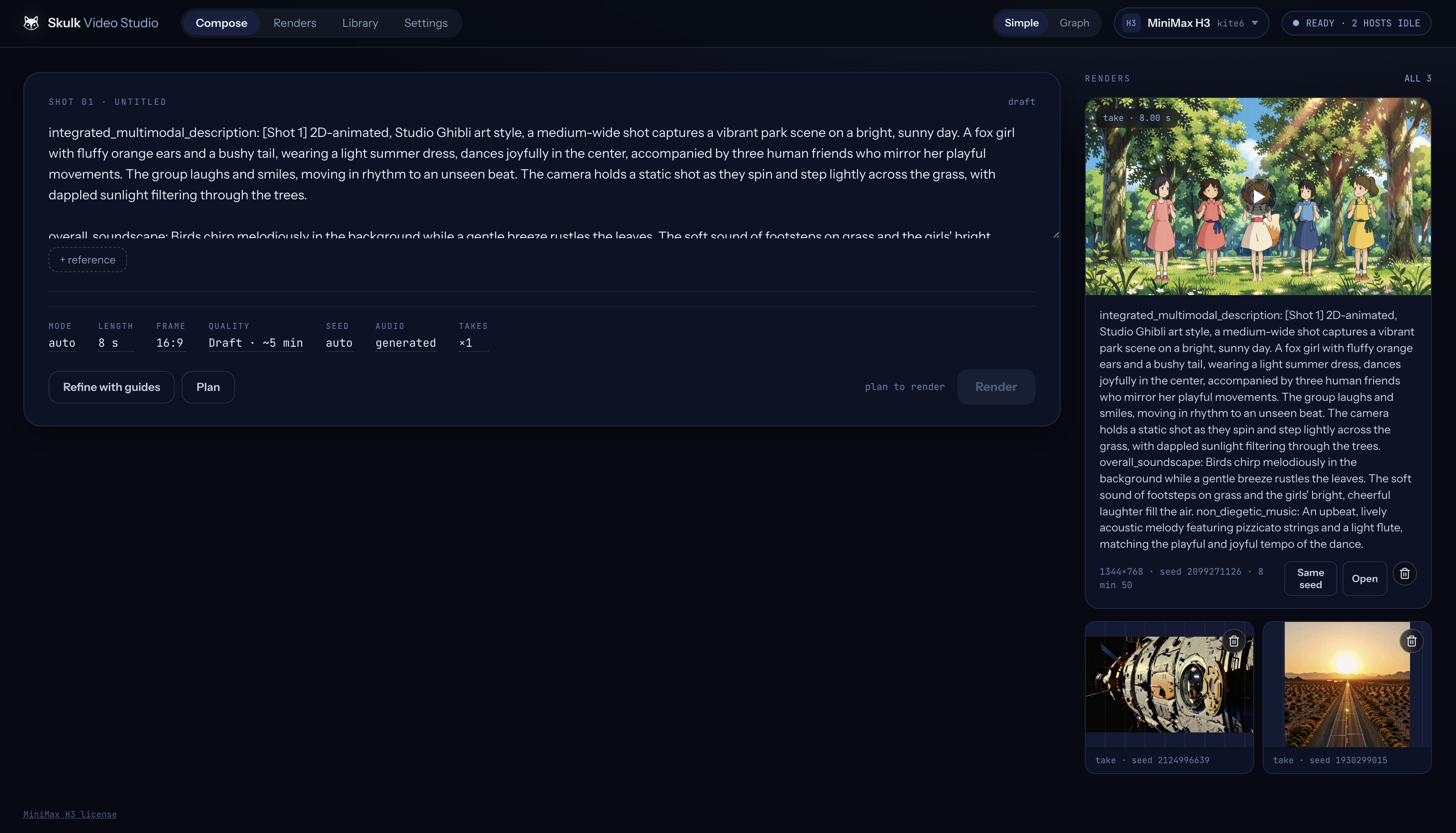
Skulk Video Studio shows how a plugin can deliver a complete application on the fabric. It provides a workspace for MiniMax H3 video creation, using Skulk's model inventory and video-job API, and a ready text model for optional prompt refinement. The Studio has its own interface, reference library, operation history, and saved takes. Its application process can run on a different machine from the model performing the render.
Compose a shot
Write the intended scene in Compose, add reference media when needed, and choose the available duration, framing, quality, seed, and audio settings. Refine with guides uses a ready text model to help structure the prompt. Plan resolves the request against the selected model and available capacity; review the plan before choosing Render.
Follow the work
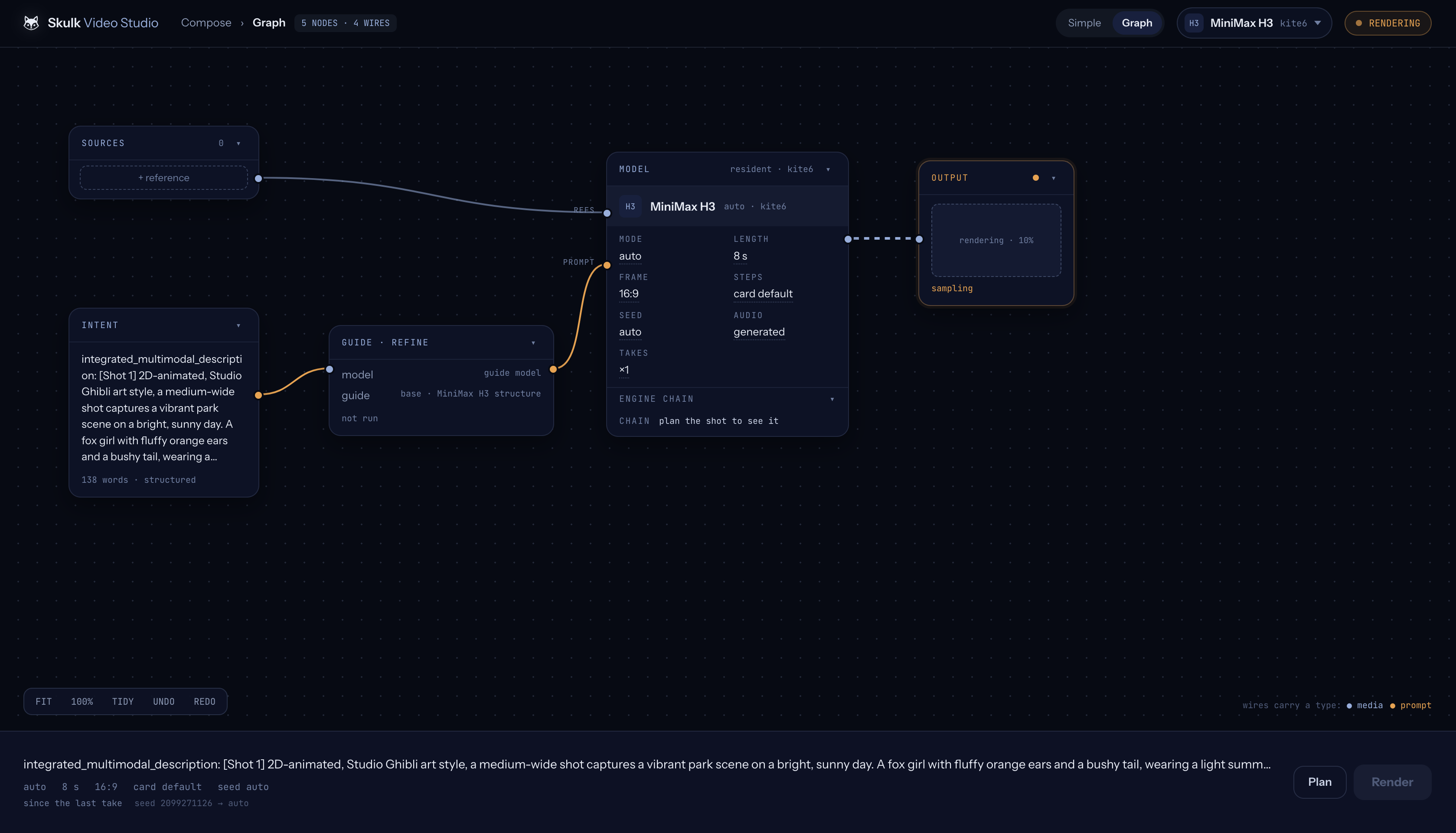
The Graph view presents the shot as connected sources, intent, refinement, model, and output. The output reports render progress while Skulk executes the video job. These are the application's workflow elements, distinct from the physical and capability nodes in Skulk's cluster topology.
Review and keep the result
Open a completed take in Renders to play it, inspect its request and seed, download it, or return to Compose. Keep protects a take from the Studio's normal retention pruning; Delete removes that take's stored media.
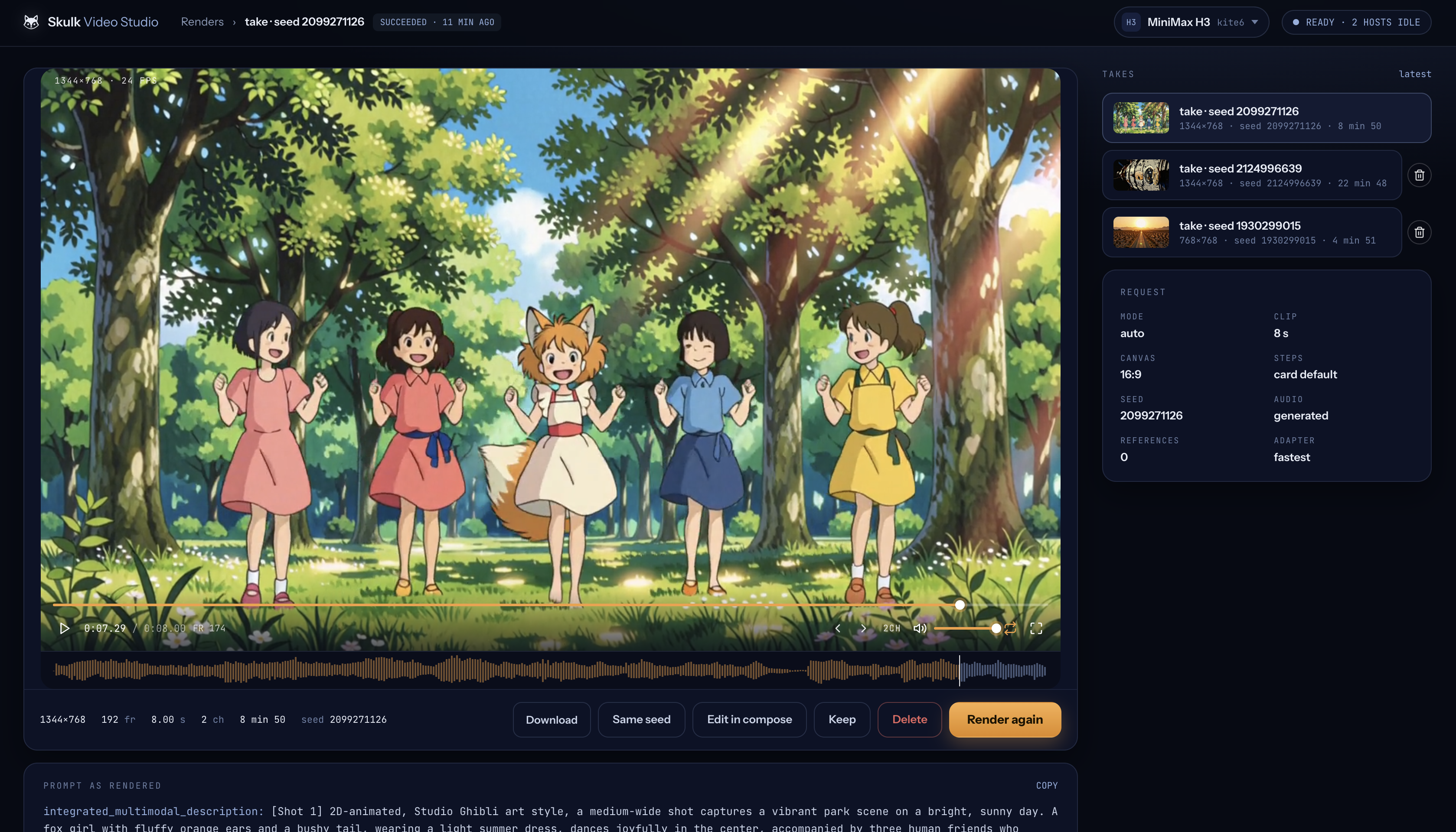
These are real application captures. Models, available controls, resource readings, and render times reflect that session.
The plugin exposes planning, readiness, rendering, prompt refinement, asset, and take-management contracts. Its UI is one way to use those capabilities. The application is packaged separately from Skulk core and calls Skulk through its APIs, illustrating how developers can build applications on the platform.
What the Studio needs
The Studio renders through Skulk, so the cluster must be able to serve MiniMax H3 before a render can start:
- A render node. A Linux node with an NVIDIA GPU (CUDA) or an AMD Strix
Halo (ROCm), with about 64 GB of GPU memory. Skulk provisions the ComfyUI
engine that serves H3 on these nodes;
uv run skulk doctorreports its state. Apple Silicon nodes cannot render H3. - Video models turned on. Add
SKULK_ENABLE_VIDEO_MODELS=trueto~/.skulk/skulk.envon each node and restart Skulk. Video model cards stay hidden until then. - A placed model. Place a MiniMax H3 card (FL2VA or Ref2VA) from Model Store. Each is about 49 GB to download. Place it before installing the Studio; if the Studio was installed first and its setup check reports that no video model is placed, disable and re-enable it in Plugins once the model is ready.
- Licence terms. MiniMax H3 open-weight use is territorially scoped by its licence. The model card shows the notice before download.
- Optional: a ready chat model for Refine with guides.
Manage plugins
Skulk core owns discovery, routing, plugin management, and the dashboard. A plugin supplies its implementation, configuration schema, setup checks, and provider-specific policy. Use Plugins to install and manage these packages; use their topology actions to discover and open what they provide.
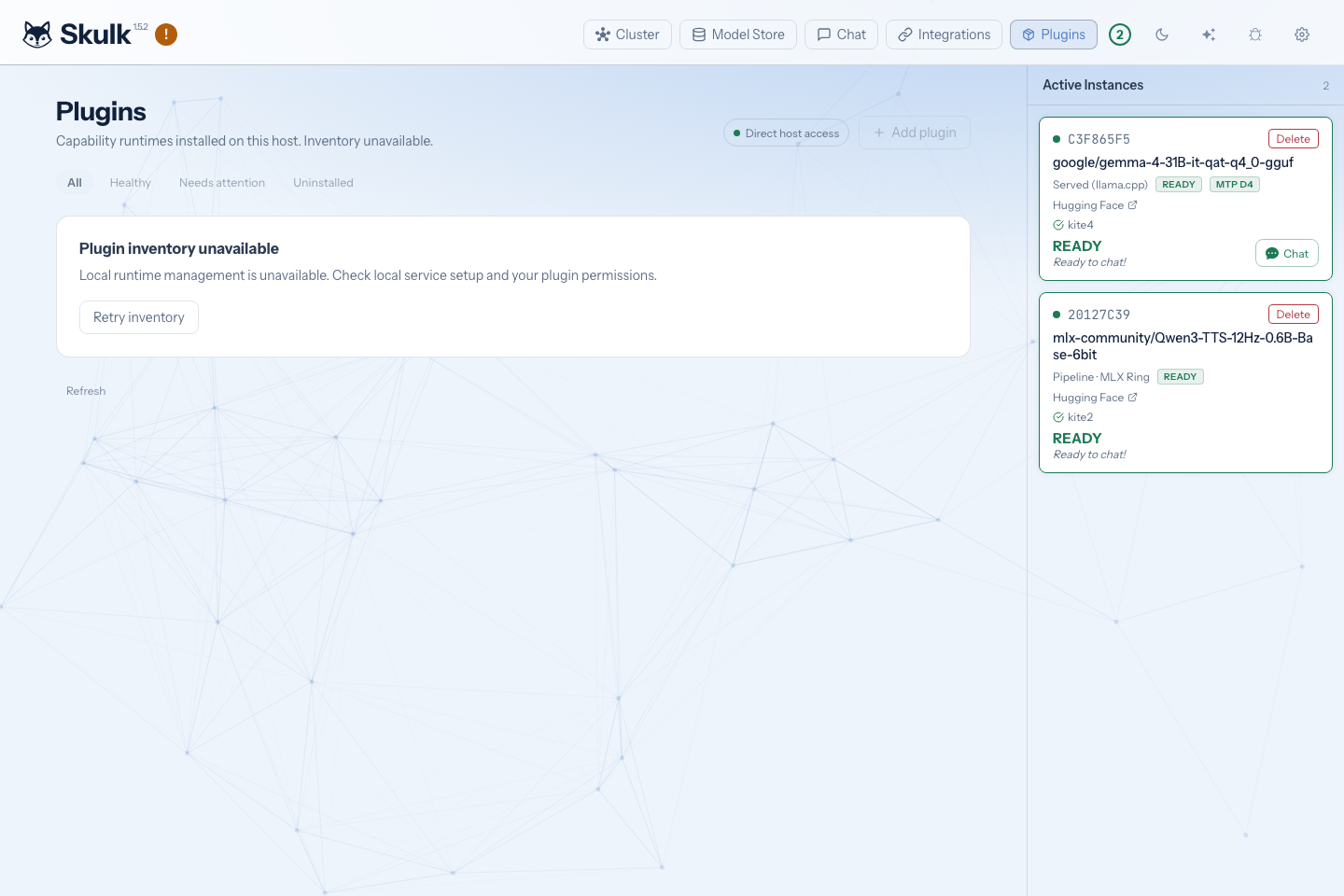
Each node manages its own plugins, and admits a browser that reaches it over Tailscale. So an owner on any tailnet machine can manage every node's plugins:
- Plugins lists the cluster's other nodes, each linking to that node's own Plugins page at its Tailscale address.
- A capability's Manage on entry, followed by its host's name, in its topology flyout and its details, opens that host's dashboard on the plugin.
A node that reports no Tailscale address is named without a link; open its dashboard on the node itself.
Process separation helps lifecycle management; it is not a sandbox against malicious code running as the same operating-system user. Install bundles from publishers you trust.
Get a compatible plugin
A public plugin store is coming soon. For now, obtain plugins directly from their publishers.
Obtain the release and owner instructions from its publisher. Check supported platforms, exact runtime compatibility, permissions, required services, costs, and cleanup procedures before installing. A matching version label alone is not proof of compatible bytes or dependencies.
A publisher can also give you a signed catalog: an address and the publisher
trust to verify it, often as a single invitation code. Connect it under
Plugins, then Browse, which lists its plugins and says which releases fit
this host (see From a catalog). From a terminal,
skulk-plugin-service catalog lists the releases that match this host, and
skulk-plugin-service install-plugin --from-catalog BUNDLE_ID installs one
through the same consent steps as a single release (prefix both with
uv run from the Skulk directory on a source install). See
Extensions.
The RunPod cloud-capacity plugin is distributed privately to owners with access. Its supplier must provide the compatible release, trusted publisher information, download access, and complete administration handoff. You do not need to clone its private source repository for ordinary use.
Install and enable
Open Plugins on the host that will manage the installation. Initial service setup and publisher trust require owner access; a paired browser cannot grant itself that authority.
First, set up the host's plugin-management service once. On a source install,
run uv run skulk-plugin-service setup from the Skulk directory as the user who
runs Skulk (see Install). It asks for
your administrator password to register the service (Apple Silicon macOS, or
Linux with systemd). Until it is ready, Plugins reports that local runtime
management is unavailable; uv run skulk-plugin-service status shows its
progress.
From a catalog
- Open Plugins, then Browse. If the host has no catalog yet, paste the
invitation code from the publisher (it starts with
skulk-catalog:), or enter the catalog address, publisher name and publisher key, then select Connect. The code carries no authority of its own: every release is still verified against the publisher key before anything installs. - Each card is one plugin. Review and install opens its review. An installed plugin with a newer release that fits this host offers Review update instead, including one that stopped fitting after a Skulk update. A card that reads Not built for this host has no release for this host's Skulk build or platform; its publisher has to build one.
- The review shows what the release's signed listing says: publisher, version, download size, platforms, permissions, the screens it opens, the capabilities it adds, and whether any of its actions can spend money. Accept the permissions, then select Install or Update.
- The page follows the download, staging, and activation. You can leave it: when you return in the same browser, Browse picks the install up where it was and reads its progress back instead of starting it again.
- Set it up shows what each of the plugin's nodes reports. A node that needs you offers the plugin's own setup checks and Open settings, which opens its configuration and credentials under Installed. Its screens open from here once it reports ready.
An update replaces the release on the same installation; its settings and saved work stay.
From a release source
- In Add plugin, enter the supplied release source, metadata filename, publisher trust, and feed credential where required.
- Save the source and inspect the release. Review its signature, compatibility, expiry, and permissions before downloading.
- Download and install, then accept the reviewed permissions and activate the staged release.
- Configure the capability, supply credentials through the separate credential controls, complete its setup actions, and select Check setup.
- Correct any reported issues and enable the capability once checks pass.
Installation, activation, configuration, readiness, and enablement are different states. An installed plugin can expose setup controls without advertising a ready capability. Credentials are write-only through management: read responses show requirements and readiness, not the secret values.
If a download or setup request loses its connection, inspect the existing operation and its recovery action. Accepted work may continue after the browser closes; creating another installation is not a safe way to resume it.
Permissions and remote management
Browser access supports three separate grants:
| Scope | Authority |
|---|---|
plugins:read | Read installation state, checks, setup progress, and proposal reviews |
plugins:manage | Perform supported configuration and management actions |
plugins:approve | Approve an exact reviewed proposal or a setup action that requires approval |
Ordinary pairing grants none of these automatically. Trust setup and changes to credential destinations remain direct-owner operations. Plugin management does not imply permission to spend money.
Example: adding cloud GPU capacity
The RunPod plugin can prepare a temporary GPU for a selected model, join that capacity to Skulk, and make the ready model available through ordinary inference. The plugin's owner distribution requires a supported management host and a separate cleanup host, a RunPod account and API key, a verified secure connection between hosts, and explicit spending and lifetime limits. The cleanup host must remain available until outstanding resources are confirmed gone.
After the supplier's setup procedure, enable Intelligent Fabric in Skulk Settings and enable proposals in the plugin's configuration. These controls permit proposal preparation, not purchases.
A typical request to the Skulk conversation is:
Prepare a RunPod capacity proposal for MODEL_ID with an 8192-token context. Show the hardware, cost limits, and cleanup terms for review.
Replace MODEL_ID with an exact catalog selection. This example does not imply
that every model has suitable cloud capacity or that every placement shortfall
automatically rents a GPU.
Open Plugins → Review proposals, refresh, and review the retained proposal. Check the model, context, hardware, location, price, maximum cost, campaign usage, resource lifetime, and approval expiry. Approve and execute reviewed proposal is the distinct action that can begin paid work. Keep its operation ID and follow progress; a created Pod is not yet a ready model. Start chat only once the requested model instance reports ready.
If approval or acquisition has an uncertain result, observe that same operation. Do not submit another acquisition to retry an ambiguous create. Proposal records, approval history, and cleanup receipts must be preserved across restarts.
Finish work and confirm cleanup
For a cloud rental, prepare and review a release proposal, approve it, and follow cleanup until the provider confirms the resource is absent. An acknowledged delete is not proof of absence. Independent expiry cleanup retains its obligation if the management host stops, but provider outages can delay observation or termination; the deadline is not a guaranteed billing cutoff.
Disable and Uninstall withdraw future plugin work. Neither confirms that an existing cloud resource is gone. RunPod Network Volumes are separate storage resources and are not removed by Pod cleanup. Use the supplier's recovery instructions before purging installation state or replacing an owner.
For capability authors
Skulk exposes generic capability discovery and call contracts alongside separate plugin-management APIs. Implementations should declare their schemas, effects, readiness, bounds, and lifecycle explicitly. Model tools can prepare supported proposals, but the provider's authority checks remain responsible for execution. See Extensions, the Architecture reference, and the API guide for core contracts.
A capability implementation declares its operations and schemas, reports readiness, and defines the interfaces and actions its node exposes. Its plugin packages that implementation for installation and lifecycle management. Keep application logic in the plugin and use Skulk APIs for compute and model jobs, as Video Studio does. Distribution of an individual plugin does not imply that its source or all authoring tools are public; obtain the applicable SDK and release tooling through the publisher's supported developer channel.